GPS Monitor
What is it?
GPS Monitor displays detailed information about visible satellites and location data provided by satellite navigation systems.
Main features:
• basic information about the positioning system (location data, speed, bearing, number of visible satellites);
• map of visible navigation satellites;
• list of navigation satellites and its main parameters (system type, ID number, azimuth, elevation, signal-to-noise ratio);
• location data (longitude, latitude, altitude) and world map with location marker.
Overview tab
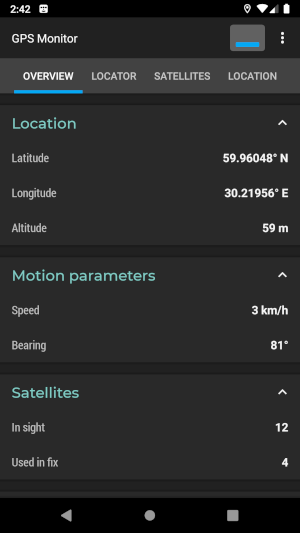
This tab contains information about current state of navigation system:
• current longitude, latitude, altitude;
• current speed and bearing;
• number of visible satellites and number of satellites used in fix.
Locator tab
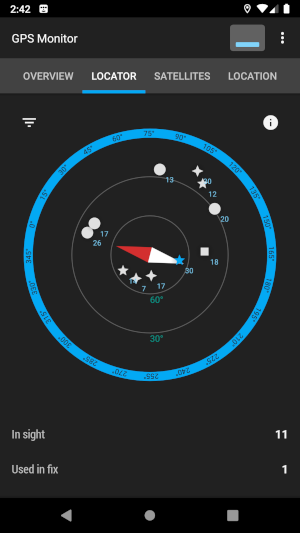
Locator is a constantly updated map of navigation satellites. The map rotates like a compass: the red arrow points north, the white arrow points south. Satellite icons are plotted in a polar coordinate system according to its azimuth and elevation. Icon near the edge of the map indicates that the satellite is not far from the horizon. An icon in the center of the map means that satellite is above the observer. Satellites used in location fix are highlighted. It is possible to filter satellites by system type and by usage.
Satellites tab
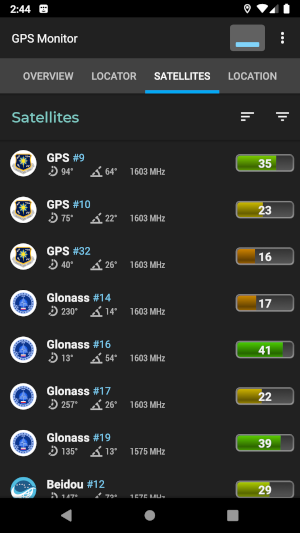
The tab contains a list of navigation satellites and their basic parameters: type, ID, azimuth, elevation, signal-to-noise ratio and signal frequency. The list can be filtered by system type and usage. It is possible to sort the list by signal-to-noise ratio and by navigation system.
Location tab
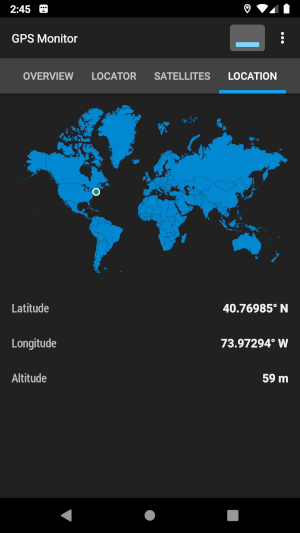
This section contains a world map and the current location marker. Besides, there is longitude, latitude and altitude values.
App store links
The official version of the app can be installed from Google Play, AppGallery, Galaxy Store and RuStore.